
Introduction
What is a C wire and do you actually need one for a smart thermostat?
You bought a smart thermostat. You’re excited to install it. Then you open the box and see: “C-wire required.”
Now you’re wondering what is a C-wire, whether your home has one, and what happens if you don’t.
Don’t worry — you’re not alone. The C-wire is the #1 point of confusion for smart thermostat buyers and one of the biggest reasons DIY installs fail.
According to ENERGY STAR, heating and cooling account for nearly half of the average home’s energy bill, which is why proper thermostat installation matters for both comfort and savings.
Some links in this guide may earn us a small commission at no extra cost to you. This helps support the site so we can keep creating helpful content.
In this guide, you’ll learn:
- What a C-wire is (simple explanation)
- How to check if you have one
- What to do if you don’t (4 easy solutions)
- Which smart thermostats work without a C-wire
If you’re still wondering what is a C wire and whether your home needs one, you’re in the right place.
If you’re wondering what is a C wire and whether your home has one, this guide will explain everything clearly.
Let’s break it down in simple terms.
What Is a C-Wire? (Simple Explanation)
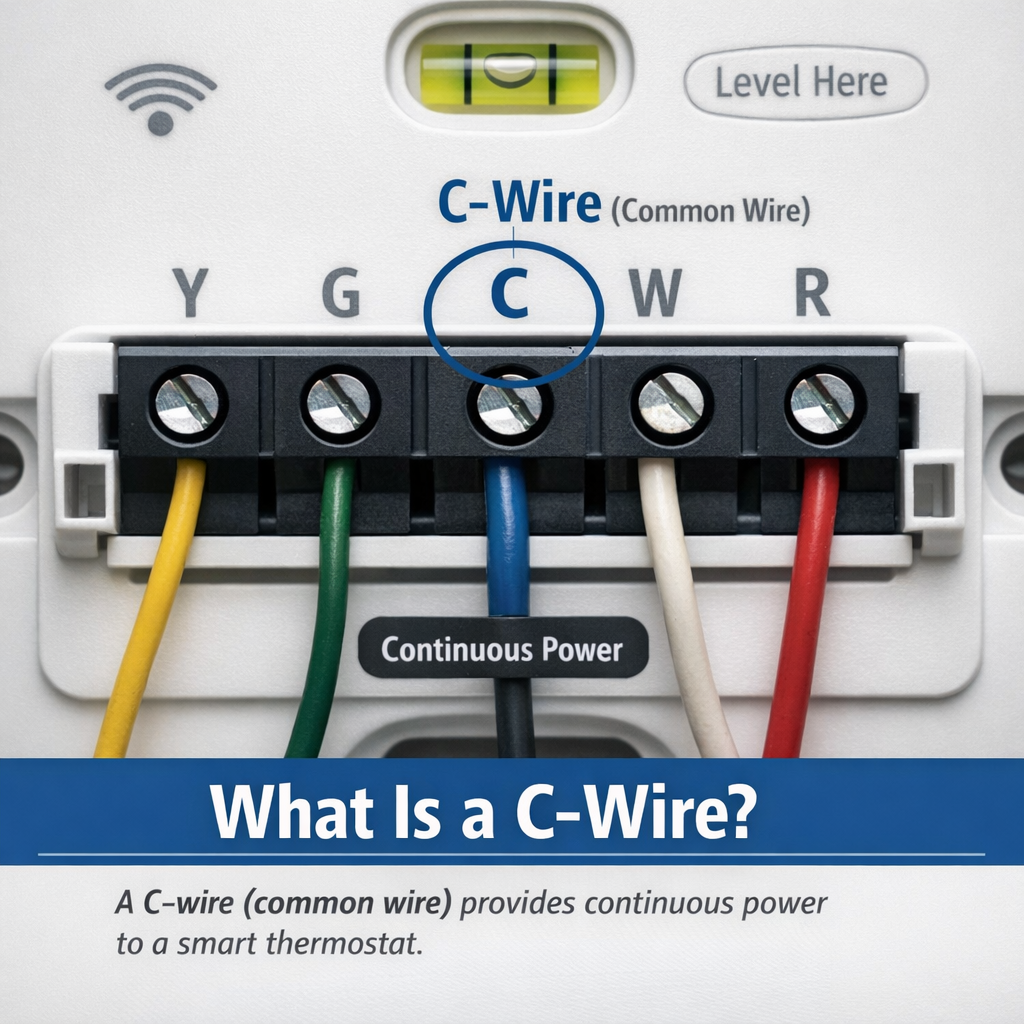
A C-wire (common wire) is a low-voltage wire that provides continuous power to your thermostat.
Understanding what is a C wire is the first step before installing any smart thermostat.
It completes the electrical circuit and allows your thermostat to stay powered 24/7.
Quick Facts
| Feature | Details |
|---|---|
| What it does | Supplies constant 24V power |
| Why it is called common | Completes the electrical circuit |
| Typical colour | Blue or black (not always reliable) |
| Found in homes | Most homes built after 1985 |
Why Older Thermostats Didn’t Need a C-Wire
Older thermostats didn’t need constant power because they weren’t “smart.”
| Thermostat Type | Power Source |
|---|---|
| Mechanical | No electricity needed |
| Basic programmable | Batteries |
| Digital (older) | Batteries or minimal power |
They only turned heating or cooling on and off — no Wi-Fi, sensors, or apps.
Why Smart Thermostats DO Need a C-Wire
Smart thermostats are essentially small computers. They need constant power for:
| Feature | Why It Needs Power |
|---|---|
| WiFi | Always connected |
| Display | Always active |
| Sensors | Constant monitoring |
| Updates | Background processes |
| Learning | Data processing |
Without a C-wire, the thermostat may try to “steal” power from other wires — which can cause problems.
⚠️ Common Issues Without a C-Wire
| Problem | What Happens |
|---|---|
| Short cycling | HVAC turns on and off repeatedly |
| Battery drain | Thermostat loses power |
| System issues | Potential damage over time |
Understanding what is a C wire is essential before installing any smart thermostat.
Do You Need a C-Wire?
You only need a C-wire if your thermostat requires constant power.
Many homeowners ask what is a C wire when their thermostat doesn’t turn on properly.
| You Likely NEED One If | You May NOT Need One If |
|---|---|
| Your thermostat uses WiFi | You use a battery powered thermostat like Nest |
| You have a touchscreen display | Your thermostat includes an adapter like Ecobee PEK |
| Your thermostat keeps losing power | You are using a C-wire adapter kit |
How to Check If You Have a C-Wire
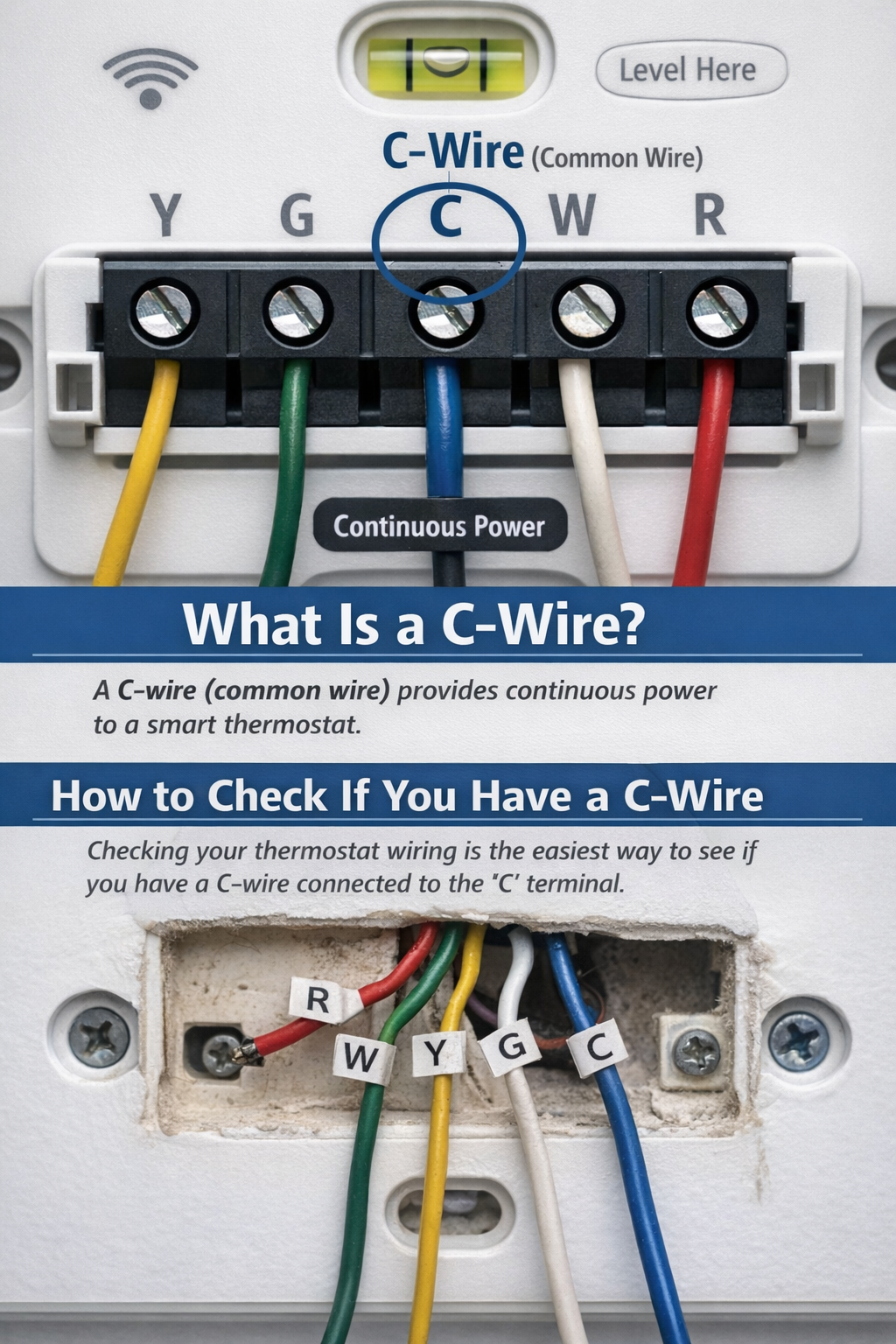
Method 1: Check Your Thermostat (Easiest)
- Turn off power at the breaker
- Remove thermostat faceplate
- Look at terminal labels
| Terminal | Meaning |
|---|---|
| C present | You have a C-wire |
| No C terminal | ❌ No C-wire |
⚠️ Always trust terminal labels, not wire color.
Method 2: Check Your Furnace (Most Reliable)
- Locate furnace control board
- Find thermostat wiring
- Look for “C” terminal
If a wire is connected there, you likely have a C-wire (even if unused at the thermostat).
Method 3: Use a Multimeter (Advanced)
Only do this if you’re comfortable:
- Set multimeter to AC voltage (24V range)
- Check voltage between R and C
- Should read ~24V
Watch: C-Wire Explained + Installation Help
Not sure what a C-wire actually looks like or how to find one? This short video walks you through everything visually in just a few minutes. It also covers how to install a smart thermostat without a C-wire using a Power Extender Kit. Sometimes seeing it is worth a thousand words.
▶️ Watch: C-Wire Explained — What It Is, How It Works and How to Install Without One
What If You Don’t Have a C-Wire? (4 Solutions)
Solution 1: Battery-Powered Thermostat
| Thermostat | Best For |
|---|---|
| Google Nest Thermostat | Easy install, most homes |
| Google Nest Learning Thermostat | Premium buyers |
- No wiring changes required
- Easy DIY installation
For more details see Google Nest Thermostat Review
Solution 2: Power Extender Kit (Ecobee)
| Feature | Details |
|---|---|
| How it works | Installs at furnace, creates a virtual C-wire |
| Included with | All Ecobee thermostats |
- Reliable solution
- No C-wire needed at thermostat
For more information: Nest vs Ecobee Comparison
Solution 3: C-Wire Adapter
| Product | Price | Best For |
|---|---|---|
| Amazon C-Wire Adapter | $25 | Amazon Smart Thermostat |
| Fast-Stat Common Maker | $50 | Universal |
| Venstar Add-a-Wire | $30 | Universal |
- Works with most systems
- Affordable solution
Solution 4: Install New C-Wire (Professional)
| Cost | Time | Best For |
|---|---|---|
| $100 to $200 | 1 to 2 hours | Permanent fix |
- Best long-term solution
- Cleanest installation
Smart Thermostats That Work Without a C-Wire
| Thermostat | Solution | C-Wire Needed? | Best For |
|---|---|---|---|
| Google Nest Thermostat | Battery | No | Easy install |
| Google Nest Learning | Battery | No | Premium |
| Ecobee (any model) | PEK included | No (with PEK) | Advanced features |
| Wyze Thermostat | Adapter included | No | Budget |
| Amazon Smart Thermostat | Adapter | No (with adapter) | Alexa users |
Best No C-Wire Option by Situation
| If You Want | Best Option |
|---|---|
| Simplest setup | Google Nest Thermostat |
| Most features | Ecobee with PEK |
| Lowest cost | Wyze or adapter kit |
| Permanent fix | Install new C-wire |
DIY or Professional Installation?
| Situation | Recommendation |
|---|---|
| Adapter install | ✅ DIY, 30 minutes |
| Battery thermostat | ✅ DIY, 15 minutes |
| New C-wire install | ❌ Professional, $100 to $200 |
Frequently Asked Questions
Can I install a smart thermostat without a C-wire?
Yes — using battery-powered models or adapters.
What color is a C-wire?
Usually blue or black — always check the terminal label.
Can I add a C-wire?
Yes — an HVAC technician can install one.
Why won’t my thermostat charge?
Without a C-wire, it may not get enough continuous power.
Do battery-powered thermostats need a C-wire?
No — they recharge during system operation.
Final Verdict: Do You Need a C-Wire?
| Situation | Solution |
|---|---|
| Have a C-wire | Use any thermostat |
| No C-wire | Use Nest, adapter, or Ecobee PEK |
| Want easiest setup | Google Nest Thermostat |
| Want best features | Ecobee with PEK |
Our recommendation:
For most homes, the Google Nest Thermostat is the easiest no C-wire solution.
For more advanced features, Ecobee with PEK is an excellent choice.
Related Guides
Final Thoughts
The C-wire sounds technical, but it’s really just a power wire that helps your smart thermostat work properly.
Quick recap:
| Key Point | Summary |
|---|---|
| C-wire | Provides continuous power |
| Smart thermostats | Need constant power |
| No C-wire | Use battery or adapter solutions |
| Before buying | Always check your wiring |
Once you understand what a C-wire is, choosing and installing a smart thermostat becomes much easier.
Now you understand what is a C wire and how it affects your thermostat installation.
By now, you should fully understand what is a C wire and how it affects your thermostat setup.
Reviewed by The Thermo Expert Team
The Thermo Expert Team researches and compares smart thermostats, heating systems, and common HVAC issues to provide clear, practical advice for homeowners. Our content is based on manufacturer documentation, real user experiences, and industry research to help you understand problems quickly and choose the right solution with confidence.