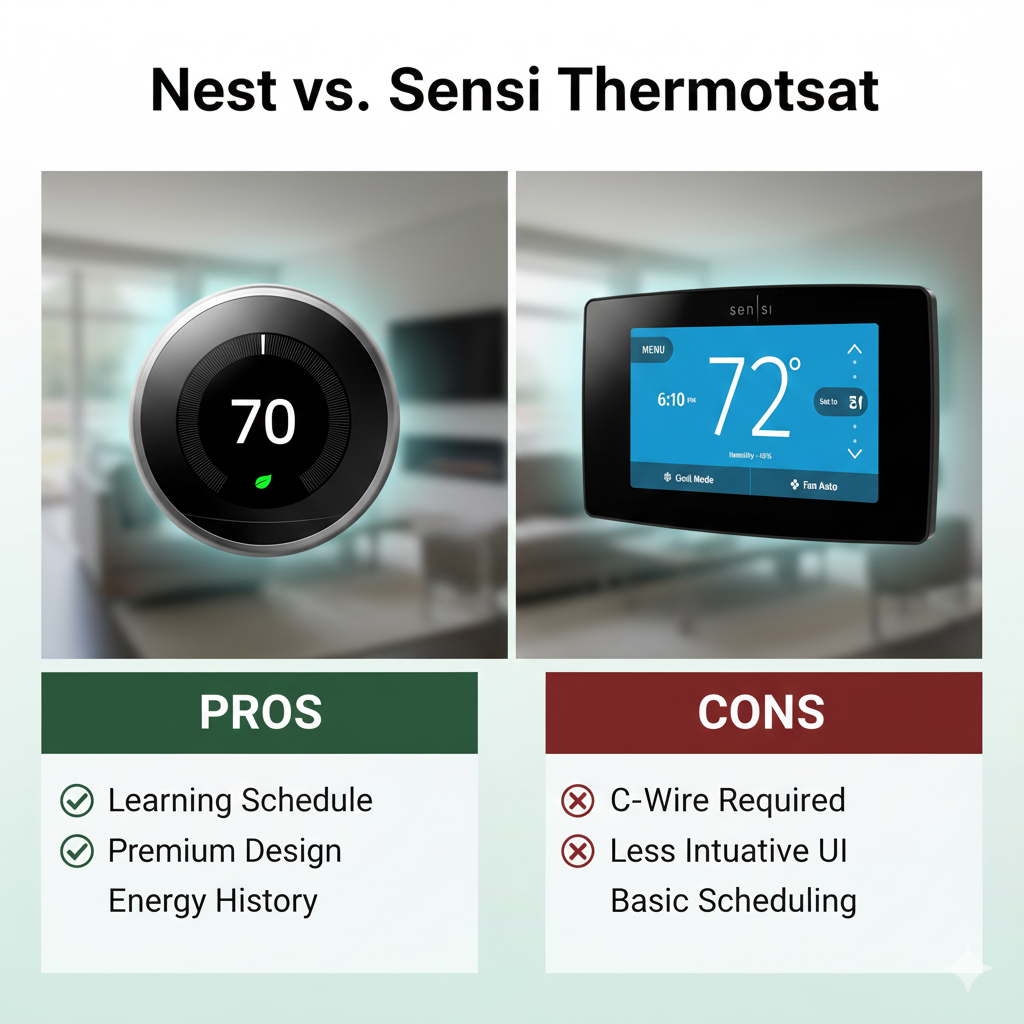
Nest vs. Sensi Thermostat: Silicon Valley Style or HVAC Reliability?
When choosing a smart thermostat, homeowners usually fall into one of two camps: those who want a futuristic gadget that thinks for itself, and those who want a reliable tool that just works. This dichotomy is perfectly illustrated in the battle of Nest vs. Sensi.
Google Nest revolutionized the industry with sleek glass designs and learning algorithms. Emerson (now Copeland) Sensi, on the other hand, leveraged 100 years of HVAC experience to build a thermostat that technicians love and homeowners find incredibly easy to install. But which approach is right for your home?
In this comprehensive comparison, we test the Nest Learning Thermostat against the Sensi Touch Smart Thermostat to determine which device offers the best balance of features, installation ease, and energy savings.
At a Glance: The Tale of the Tape
Here is a quick breakdown of how the flagship models compare. Note that both brands offer budget versions (Nest Thermostat 2020 and Sensi Lite), but we are focusing on the core experience.
| Feature | Google Nest Learning (v3/v4) | Emerson Sensi Touch (ST75) |
|---|---|---|
| Design Philosophy | Modern Art / Round | Traditional / Rectangular |
| C-Wire Requirement | “Not Required” (But recommended) | Required for Touch / Optional for Classic |
| Smart Home Support | Google Home, Alexa, Matter | HomeKit, Alexa, Google, SmartThings |
| Primary Feature | Auto-Learning Schedule | Contractor-Grade Reliability |
| Installation Difficulty | Medium (Wiring can be tricky) | Easy (DIY Friendly) |
Round 1: Design & Aesthetics
The physical difference between these two units is stark.
Google Nest: The Showpiece
The Nest Learning Thermostat is iconic. With its stainless steel ring and crisp glass display, it looks like a piece of jewelry on your wall. It uses a “Farsight” feature to wake up when you walk by, displaying the weather or time. However, its round shape means if you have a rectangular hole or unpainted patch from your old thermostat, you will likely need to use the included trim plate or do some painting.
Sensi: The Practical Choice
The Emerson Sensi Touch review units highlight a design that mimics a standard thermostat. It is rectangular, covering the same footprint as most old Honeywell or White-Rodgers units. This means no patching, no painting, and no ugly holes. While the Sensi Touch has a nice full-color touchscreen, it doesn’t try to be a piece of art. It tries to be a thermostat.

Round 2: Installation & The C-Wire Debate
This is the most critical technical difference. If you are worried about installation, read this carefully.
Nest’s “Power Stealing”
Nest claims compatibility with 95% of systems, often without a Common Wire (C-wire). It does this by “pulsing” the HVAC wires to charge its internal battery. For many, this works. But for others, it causes significant headaches. Without a C-wire, you might experience thermostat low battery symptoms or find that your thermostat keeps rebooting whenever the furnace runs.
Sensi’s Flexibility
Sensi is the darling of the DIY community for a reason.
- Sensi Smart Thermostat (ST55): Does NOT require a C-wire for most systems. It uses two AA batteries as a backup/power source. This makes it the absolute easiest smart thermostat to install in older homes.
- Sensi Touch (ST75): DOES require a C-wire because of the large color screen.
If you have an older home and don’t want to run new wires or use adapters, the classic Sensi ST55 is the winner, hands down.
Round 3: Intelligence vs. Control
Do you want a robot that learns your life, or a remote control for your furnace?
Nest: The Learning Algorithm
Nest’s claim to fame is its AI. You spend a week adjusting the dial, and it learns your schedule. It uses sensors to detect if you are home (Home/Away Assist) and adjusts accordingly to save energy.
The Downside: The algorithm isn’t perfect. If you have an irregular schedule, Nest can get confused, turning down the heat when you are home just because you usually aren’t. Many users end up turning off the “Learning” feature and using it as a standard programmable thermostat.
Sensi: Direct Control
Sensi doesn’t try to guess your schedule. It relies on geofencing (via your phone’s location) and standard 7-day scheduling. For control freaks who want to know exactly what their HVAC is doing, Sensi is superior. If you are asking what is geofencing thermostat capability, Sensi’s implementation is robust and doesn’t rely on motion sensors on the wall unit.
When asking do smart thermostats really save money?, both achieve savings, but Nest does it passively while Sensi requires you to set the schedule initially.
Round 4: Ecosystem Compatibility
The battle of Nest vs. Sensi often comes down to what phone you have in your pocket.
Apple HomeKit
Sensi has historically been much friendlier to Apple users. Most Sensi models support Apple HomeKit natively. You can ask Siri to change the temperature right out of the box. Nest has only recently added support via the Matter protocol, but legacy Nest units struggle with Apple integration without complex workarounds (Starling Home Hub, etc.).
Google & Alexa
Both thermostats work flawlessly with Amazon Alexa and Google Assistant. However, Nest obviously integrates deeper into the Google Home ecosystem. If you are comparing Google Nest vs Amazon Smart Thermostat, you see similar ecosystem lock-in. Sensi remains neutral ground, playing nice with everyone.
If you are looking for comparisons against other brands, check our Honeywell vs Emerson thermostat guide to see how Sensi stacks up against another HVAC giant.
Winner: Sensi for broad, native compatibility (especially HomeKit).Round 5: Reliability & Troubleshooting
Emerson (Sensi) has been making thermostat components for decades. Their relays are “contractor-grade.”
Nest Issues: Nest units are essentially small computers. They can freeze, suffer from Wi-Fi chip failures (the famous w5 error), or drain their batteries. When a thermostat is not reaching set temperature, with Nest, it could be a software update gone wrong.
Sensi Reliability: Sensi thermostats are built like tanks. If something goes wrong, it is usually a system issue, not the thermostat. However, if you do encounter issues, we have guides on how to reset your sensi thermostat and troubleshooting steps for why is my sensi thermostat not working.
Furthermore, if your thermostat says heat on but no heat, Sensi’s app provides excellent diagnostic context, often telling you if the issue is voltage-related.
Pros & Cons: The Verdict
Google Nest Learning
Pros
- Stunning, modern design.
- “Learning” feature is great for hands-off users.
- Farsight display is useful.
- Seamless Google Home integration.
- Integration with Nest Protect (Smoke/CO).
Cons
- Expensive.
- Often requires a C-wire despite marketing claims.
- Weak native HomeKit support (requires Matter).
- Round shape reveals old wall paint.
Emerson Sensi Touch
Pros
- Easy DIY installation (especially the Classic).
- Native Apple HomeKit support.
- Rectangular shape covers old holes.
- Highly reliable “contractor-grade” build.
- Excellent app interface.
Cons
- Looks like a standard thermostat (boring).
- Touch model requires C-wire.
- Lacks room occupancy sensors (unlike Nest/Ecobee).

Frequently Asked Questions
Is Sensi owned by Honeywell?
No. Sensi is a brand by Emerson (now Copeland). They are a direct competitor to Honeywell. See our Honeywell vs Emerson thermostat guide for more details.
Does Nest work without a C-wire?
Technically yes, but it is not recommended. Without a C-wire, Nest uses “power stealing” which can cause Wi-Fi disconnections and short-cycling of the furnace. We highly recommend installing a C-wire or an adapter.
Which thermostat is better for landlords?
The Sensi (Classic) is often preferred by landlords because it is cheaper, battery-powered (no wiring headaches), and features a “keypad lockout” to prevent tenants from messing with settings excessively.
Does Sensi have room sensors?
Only the newer Sensi Touch 2 supports remote room sensors. The original Sensi Touch and Smart Thermostat do not support external room sensors, unlike Nest vs Ecobee thermostat comparisons where sensors are standard.
How do I know if my thermostat is bad?
If the screen is blank, temperature readings are inaccurate, or the system doesn’t respond to calls for heat, check our guide on how to tell if your thermostat is bad.
Final Verdict: Which One Should You Buy?
The choice between Nest vs. Sensi is clearer than most tech comparisons.
Choose the Google Nest Learning Thermostat if:
- You value design and want a thermostat that looks impressive.
- You want the “Learning” capability so you don’t have to program schedules.
- You have other Google Nest products (Cameras, Protects, Hubs).
- You have a C-wire installed (or are willing to install one).
Choose the Emerson Sensi if:
- You live in an older home with no C-wire (choose the Sensi Classic ST55).
- You want native Apple HomeKit support.
- You want a reliable, no-nonsense interface.
- You want to cover up the ugly unpainted spot left by your old thermostat.
- You are looking for the best value.
Our Expert Recommendation: For most DIY homeowners, the Emerson Sensi is the safer, less frustrating bet. It connects easily, stays connected, and doesn’t require complex wiring work. But if you want the ultimate smart home centerpiece, Nest still holds the crown for style.

Ready to Upgrade?
Get the reliability of Sensi or the intelligence of Nest today.
Looking for more energy-saving tips? Check out our article on what is the best smart thermostat for energy savings or browse our complete thermos guide to keep yourself warm while your thermostat handles the house.






 Home
Home
 Info
Info
 Compare
 Reviews
 Shop
Shop