

Nest Learning Thermostat Review: Is the Original Still the Best?
It has been over a decade since the original Nest Thermostat revolutionized the HVAC industry. Before its arrival, the thermostat was a beige, rectangular eyesore that most homeowners ignored until something broke. Nest changed everything by turning a utility switch into a desirable piece of home technology. But in a market now flooded with competitors, does the Nest Learning Thermostat (now in its 4th Generation, alongside the enduring 3rd Gen) still hold the crown?
With heavy competition from Ecobee and Honeywell, Google’s flagship device has to rely on more than just good looks. In this comprehensive review, we test its installation ease, “learning” capabilities, sensor accuracy, and whether it is truly the best smart thermostat for energy savings.
Design & Build Quality: The Apple of HVAC
If there is one category where Nest remains undefeated, it is industrial design. The device features a solid stainless steel ring (available in copper, black, silver, and white) that acts as the primary control mechanism. Unlike touchscreen-only devices such as the Emerson Sensi Touch review units, the Nest relies on a satisfying tactile rotation to adjust the temperature.
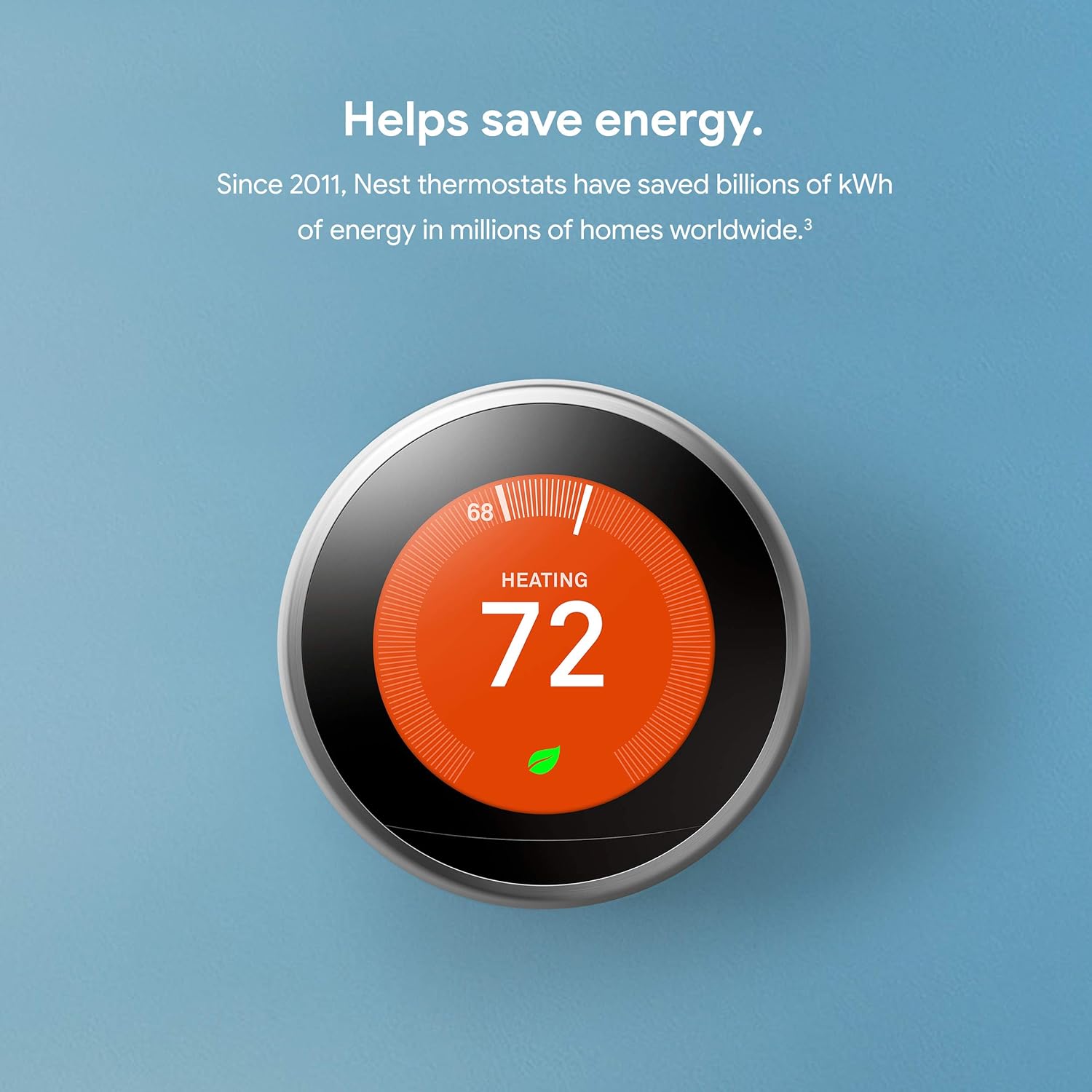
The display is a high-resolution, 24-bit color LCD covered by glass. It feels substantial. When you walk past it, the “Farsight” feature detects your presence and lights up to show the time, weather, or temperature. It turns a boring wall appliance into a clock and weather station.
However, design isn’t just about looks. The interface is intuitive. There are no confusing sub-menus hidden behind cryptic icons. You turn the dial to select, press to click. For anyone intimidated by thermostat instructions for homeowners, the Nest is a breath of fresh air.

Nest Learning Thermostat
The smartest way to save energy and stay comfortable.
Check Price on AmazonInstallation: The C-Wire Controversy
Google markets the Nest Learning Thermostat as compatible with 95% of systems, often claiming it does not require a Common Wire (C-wire). While this is technically true, it is also the source of the device’s biggest headaches.
The Nest uses a technology called “power stealing” to charge its internal battery by pulsing power from your HVAC system wires. For many homes, this works fine. However, for some systems, this power pulse causes the HVAC relays to chatter, leading to issues where the thermostat keeps rebooting or the Wi-Fi disconnects frequently.
If you install the Nest and notice thermostat low battery symptoms, you will likely need to install a C-wire adapter or run a new wire. In contrast, competitors like the Ecobee Smart Thermostat Premium review units include a power extender kit in the box to solve this exact problem.
Warning for Baseboard Heaters: The Nest Learning Thermostat is a low-voltage (24V) device. It is not a thermostat for baseboard heaters (high voltage). Connecting it to a 120V/240V system will destroy the thermostat and potentially cause a fire. For those setups, check our Mysa Smart Thermostat review.
Does the “Learning” Feature Actually Work?
The core selling point of this device is the algorithm. Most people buy programmable thermostats and never program them. The Nest solves this by programming itself.
- Week 1: You adjust the thermostat manually. You turn it down when you leave and up when you wake.
- Week 2: Nest recognizes the pattern and creates a schedule.
- Ongoing: It uses the built-in occupancy sensors and your phone’s location to enable “Home/Away Assist.”
In our testing, the auto-schedule is effective for people with predictable routines. However, if you work irregular shifts, the learning mode can sometimes be frustrating, turning down the heat while you are home just because you are usually away at that time. Fortunately, you can turn off the learning features and use it as a standard Wi-Fi thermostat.
So, do smart thermostats really save money? Google claims savings of 10-12% on heating and 15% on cooling. The “Nest Leaf” icon appears on the screen when you are saving energy, gamifying your efficiency. This psychological nudge is arguably as effective as the algorithm itself.
Comparison: Nest vs. Ecobee and Honeywell
The smart home market is a battlefield. Here is how the Nest Learning Thermostat stacks up against its main rivals.
Nest vs. Ecobee
The debate of Nest vs Ecobee thermostat is the biggest in the industry.
- Nest Wins: Aesthetics, ease of use, learning algorithm.
- Ecobee Wins: Remote sensors (included in box), Apple HomeKit integration, advanced HVAC data.
If you have a home with hot and cold spots, Ecobee’s focus on remote sensors (which Nest sells separately) makes it superior. However, for pure style and “set it and forget it” simplicity, Nest wins.
Nest vs. Honeywell
When comparing Honeywell thermostat vs Nest, you are comparing legacy HVAC reliability against modern tech. Honeywell units like the Honeywell Home T9 are utilitarian and incredibly reliable, but they lack the premium feel and intuitive app experience of the Nest.
| Feature | Nest Learning Thermostat | Ecobee Premium | Honeywell T9 |
|---|---|---|---|
| Material | Stainless Steel & Glass | Zinc & Glass | Plastic |
| C-Wire Required | No (But recommended) | Yes (Adapter included) | Yes (Adapter included) |
| Sensors Included | Usually None (Bundle varies) | 1 SmartSensor | 1 Room Sensor |
| Voice Assistant | Compatible (Alexa/Google) | Built-in Alexa/Siri | Compatible |
HVAC Monitoring and Diagnostics
A newer feature rolled out to Nest users is HVAC monitoring. The thermostat monitors the behavior of your heating and cooling system. If it notices that it takes longer than usual to cool your home—potentially indicating a thermostat not reaching set temperature efficiently—it will send you an email alert.
It can also help diagnose if your thermostat says heat on but no heat is coming out, often flagging potential furnace ignition failures. This proactive approach turns the device into a diagnostic tool, potentially saving you an emergency service call fee.
Pros & Cons
✅ The Good
- Stunning Design: The rotating metal bezel is still the best interface in the business.
- Learning Capabilities: Excellent for users who don’t want to program schedules manually.
- Farsight: Displays weather and time visibly from across the room.
- App Ecosystem: Google Home app integration is robust (though migration from the Nest app was rocky).
- Sunblock: Detects direct sunlight and adjusts sensors so it doesn’t think the room is hotter than it is.
❌ The Bad
- Price: It is one of the most expensive options on the market.
- C-Wire Issues: “Power stealing” can cause issues with sensitive HVAC boards.
- External Sensors Extra: Unlike Ecobee, you often have to buy room sensors separately.
- No HomeKit: While Matter support is improving, native Apple HomeKit integration has historically been weak compared to Ecobee.
Frequently Asked Questions
Does the Nest Learning Thermostat work with Alexa?
Yes, despite being a Google product, the Nest Learning Thermostat works seamlessly with Amazon Alexa for voice control. If you are comparing ecosystems, see our guide on Google Nest vs Amazon Smart Thermostat.
Do I need a C-wire for Nest Learning Thermostat?
Nest claims compatibility without a C-wire for most systems, but HVAC experts highly recommend one to prevent battery drain and Wi-Fi disconnection issues.
What is the difference between Nest Thermostat and Nest Learning Thermostat?
The Learning Thermostat has a metal body, Farsight display, and the ability to auto-schedule itself. The basic Nest Thermostat is plastic, has a mirrored display, and requires manual scheduling.
How do I know if my thermostat is bad?
If the display is blank, the temperature reading is wildly inaccurate, or it calls for heat but the furnace doesn’t fire, you should check our guide on how to tell if your thermostat is bad.
Can Nest control a whole-house humidifier?
Yes, the Nest Learning Thermostat has a ‘*’ terminal that can be configured to control humidifiers, dehumidifiers, or emergency heat.
Final Verdict: Is the Nest Learning Thermostat Worth It?
The Nest Learning Thermostat remains the gold standard for design and ease of use. It is the best choice for homeowners who want a premium look on their wall and don’t want to spend hours programming a schedule. The auto-schedule feature effectively saves money for users with predictable lives, and the “Leaf” system is a brilliant way to encourage efficiency.
However, if you are a tech enthusiast who wants granular control, HomeKit integration, or you have a large home with many temperature imbalances, the ecobee3 Lite Smart Thermostat review or the Premium model might be a better fit due to their superior sensor integration.
Ultimately, for those asking are wifi thermostats worth it, the Nest proves that they are—not just for the energy savings, but for the peace of mind and comfort they bring to your home.
For more tips on maintaining temperature in your home (and your beverages!), don’t forget to check our complete thermos guide and learn about the most durable thermos options for your commute.