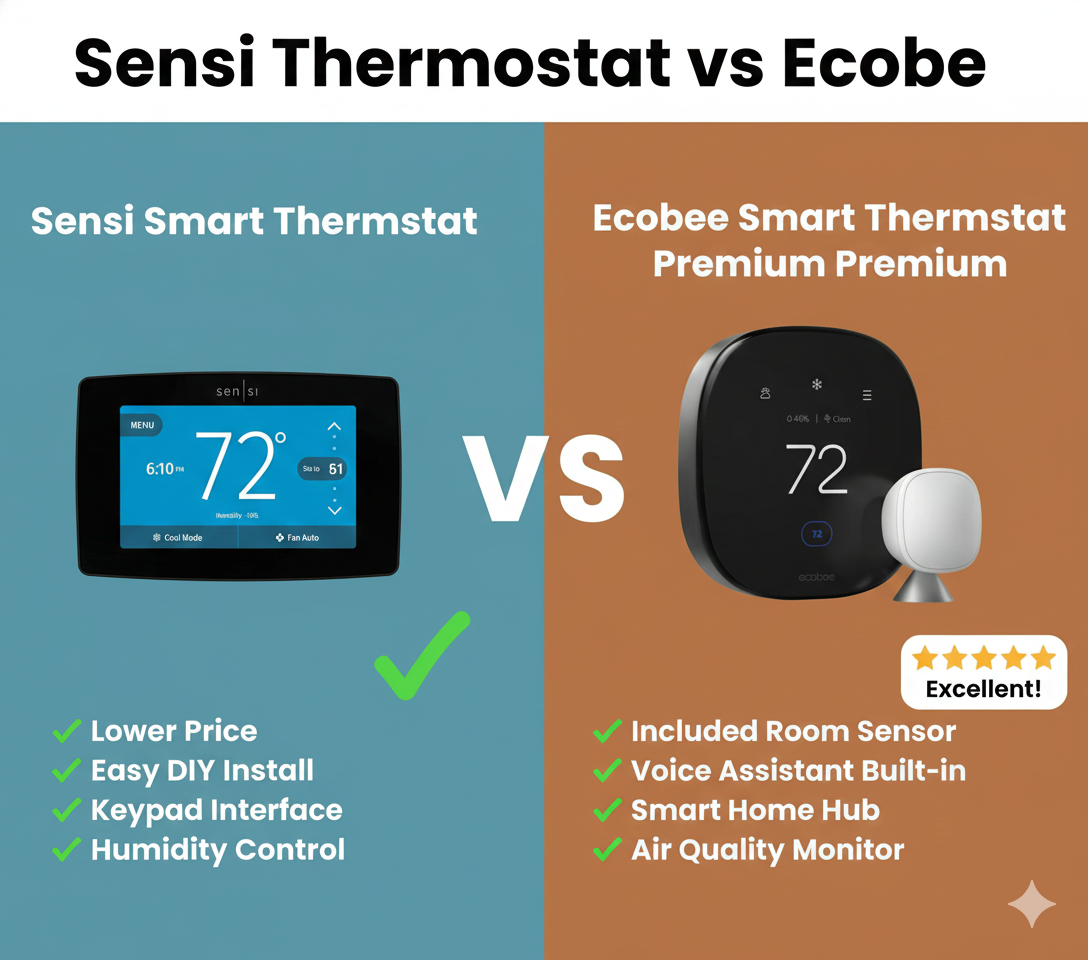
Sensi Thermostat vs Ecobee: The Battle for Your Wall
If you have been browsing the aisles of Home Depot or scrolling through Amazon looking for a way to lower your energy bills, you have undoubtedly narrowed your list down to two heavyweights: Sensi (by Emerson/Copeland) and Ecobee.
Choosing a smart thermostat used to be about which one looked the coolest. Today, it is a question of infrastructure. Thermostats explained simply come down to control, but smart thermostats add layers of complexity regarding C-wires, room sensors, and ecosystem integration.
In this comprehensive guide, we are pitting Sensi thermostat vs Ecobee to see which one deserves the spot on your wall. Are you looking for the high-tech, sensor-rich experience of Ecobee, or the ultra-reliable, “it just works” simplicity of Sensi? Let’s dive deep.
At a Glance: Sensi vs. Ecobee
Before we dissect the features, here is a quick cheat sheet comparing the flagship attributes of both brands.
| Feature | Emerson Sensi (Smart / Touch) | Ecobee (Lite / Premium) |
|---|---|---|
| Best For | Older homes, DIY beginners, landlords | Tech enthusiasts, large homes, data lovers |
| C-Wire Required | No (Standard Model) / Yes (Touch) | Yes (Includes PEK adapter) |
| Room Sensors | Available (Sold separately) | Included with Premium; Native integration |
| Voice Assistant | Compatible (Alexa/Google/Siri) | Built-in Alexa (Premium model) |
| Aesthetic | Traditional or Industrial | Futuristic, Glass, Smartphone-like |
| App Experience | Simple, functional | Robust, data-rich |
Meet the Contenders
The Sensi Family
Sensi is manufactured by Emerson (now Copeland), a brand with over 100 years of experience in the HVAC industry. Their philosophy is distinct: a smart thermostat shouldn’t require you to rewire your entire house. The Emerson Sensi Touch review scores are consistently high because they bridge the gap between “dumb” thermostats and “smart” ones.
- Sensi Smart Thermostat (ST55): Looks like a traditional thermostat. Runs on batteries. Often requires no C-wire.
- Sensi Touch / Touch 2: A large HD touchscreen that looks more modern but requires a C-wire.

The Ecobee Family
Ecobee pioneered the Wi-Fi thermostat market. They were the first to introduce room sensors, solving the age-old problem of hot upstairs bedrooms and cold downstairs living rooms. If you are wondering Ecobee vs Honeywell Home, Ecobee usually wins on innovation.
- Ecobee3 Lite: The entry-level model. No voice control built-in, but supports sensors. See our Ecobee3 Lite review.
- Ecobee Smart Thermostat Premium: The flagship. Glass face, zinc body, built-in Alexa, and air quality monitoring.

Installation: The C-Wire Debate
This is often the deciding factor for homeowners. If you live in an older home built before the 1980s, you might not have a “Common Wire” (C-wire) in your wall.
Sensi Installation
The standard Sensi Smart Thermostat is legendary for its “no C-wire required” design for most HVAC systems (heat pumps being the main exception). It relies on two AA batteries to maintain Wi-Fi connectivity when the system isn’t running. This makes it the best battery operated thermostat upgrade for older homes.
Installation is straightforward. The app guides you through wiring, and the backplate covers most paint gaps left by old thermostats.
Ecobee Installation
Ecobee requires a constant power source. If you have a C-wire, it’s plug-and-play. If you don’t, Ecobee includes a Power Extender Kit (PEK) in the box. While the PEK is a brilliant solution, it does require you to go into your furnace or air handler control board and do some wiring. If the thought of opening your furnace panel scares you, Sensi wins this round.
However, once installed, Ecobee is incredibly stable. If you are swapping from an older digital model, check our guide on how to switch out an HZ311 thermostat for an Ecobee.
Features & Performance
Remote Sensors: Ecobee’s Crown Jewel
Ecobee’s claim to fame is the SmartSensor. These small, wireless pucks detect temperature and occupancy in different rooms. You can tell the thermostat to prioritize the temperature in the “Bedroom” at night and the “Living Room” during the day.
Sensi has introduced room sensors for their Touch models, but they feel like an add-on rather than a core feature. Ecobee’s “Follow Me” mode, which adjusts heating based on which room you are actually in, is smoother and more intuitive.
Geofencing
Both brands offer geofencing. What is geofencing? It uses your phone’s GPS to tell the thermostat when you leave the house (setting it to Eco mode) and when you are returning (pre-heating or cooling the home). Sensi’s geofencing is simple and effective. Ecobee’s is part of their larger “Eco+” suite, which can sometimes be a bit aggressive in trying to save energy.
Smart Home Integration
If you are comparing Nest vs Ecobee or Sensi, integration matters.
- Ecobee: Works with Apple HomeKit, Alexa, Google Assistant, SmartThings, and IFTTT. The Premium model has a speaker and microphone, doubling as an Alexa device.
- Sensi: Also works with HomeKit, Alexa, Google, and SmartThings. However, it is purely a controller; you cannot speak to the thermostat unless you have a separate smart speaker.
Design & Usability
Do you want a gadget that looks like a smartphone, or a thermostat that looks like… a thermostat?
The Ecobee Aesthetic
Ecobee thermostats feature glass fronts, high-resolution touch screens, and a sleek, rounded-square shape. They look premium and futuristic. The interface is gesture-based, similar to using an iPhone.
The Sensi Aesthetic
The Sensi ST55 looks like a standard white plastic thermostat. It has physical buttons. For many users, specifically the elderly or those who dislike touchscreens, the tactile click of a button is superior. The Sensi Touch 2 is more modern, with a glass screen, but still retains a utilitarian “HVAC” feel compared to Ecobee’s “Tech” feel.
Reliability & Troubleshooting
No tech is perfect. When looking at thermostat reliability, Sensi is often praised for its “set it and forget it” nature.
Common issues for Sensi usually revolve around Wi-Fi dropouts if the batteries get low. If you experience this, check our guide on why is my Sensi thermostat not working.
Ecobee is power-hungry. If your C-wire isn’t delivering consistent voltage, you might see the thermostat keeps rebooting. However, Ecobee’s support and diagnostics are top-tier, often emailing you if they detect your furnace is acting inefficiently.
Pros & Cons Breakdown
Sensi Pros
- ✅ Easiest installation (often no C-wire needed).
- ✅ Classic design blends in; physical buttons available.
- ✅ Highly reliable app.
- ✅ Typically cheaper upfront cost.
- ✅ Excellent for landlords (lockout features).
Sensi Cons
- ❌ Lacks advanced data reporting.
- ❌ Room sensors are sold separately and less integrated.
- ❌ Not as “sleek” looking as competitors.
- ❌ No built-in voice assistant.
Ecobee Pros
- ✅ Superior room sensor technology.
- ✅ Beautiful, premium glass interface.
- ✅ Built-in Alexa (Premium model).
- ✅ Includes Power Extender Kit for C-wire homes.
- ✅ Advanced energy reports and air quality monitoring.
Ecobee Cons
- ❌ More expensive.
- ❌ Installation can be complex if using the PEK.
- ❌ Interface can be overwhelming for non-tech users.
- ❌ Requires constant power (no battery backup for operation).
Are There Other Alternatives?
While Sensi and Ecobee are top-tier, the market is crowded. If budget is your primary concern, you might look at the Wyze vs Govee thermostat comparison for budget-friendly options.
If you are deep in the Google ecosystem, you might consider the Google Nest vs Amazon Smart Thermostat. Nest offers a learning capability that neither Sensi nor Ecobee fully replicates, though Ecobee’s scheduling is often preferred by control freaks who don’t want a robot guessing their schedule.
Frequently Asked Questions
Does the Sensi Thermostat save as much money as Ecobee?
Yes. Do smart thermostats really save money? Absolutely. Both brands claim roughly 23% savings on HVAC costs. The savings come from scheduling and geofencing, which both handle well. Ecobee has a slight edge with “Eco+” which adjusts for Time of Use electricity rates.
Can I use Sensi if I have baseboard heaters?
Typically, no. Most smart thermostats, including standard Sensi and Ecobee models, work with low-voltage (24V) systems. For high-voltage baseboards, you need a specialized thermostat for baseboard heaters, such as Mysa.
What if my thermostat says heat on but no heat is coming out?
This is a common HVAC issue, not necessarily the thermostat’s fault. However, incorrect wiring during installation is a frequent culprit. Check our guide: thermostat says heat on but no heat.
Is the Ecobee Premium worth the extra money over the Lite?
If you want voice control, air quality monitoring, and the premium zinc/glass build, yes. If you just want Wi-Fi control and sensor compatibility, the Ecobee3 Lite is a fantastic value.
Final Verdict: Which One Should You Buy?
The battle of Sensi thermostat vs Ecobee ends not with a knockout, but with a split decision based on your home and your personality.
Choose the Sensi (Smart or Touch) if:
- You live in an older home and do not have a C-wire.
- You want a simple, stress-free installation.
- You prefer physical buttons or a traditional interface.
- You are a landlord who wants a durable, easy-to-use unit for tenants.
Choose the Ecobee (Lite or Premium) if:
- You have hot and cold spots in your home (you need those room sensors).
- You love data, charts, and optimizing efficiency.
- You want a premium, modern look on your wall.
- You use Apple HomeKit or want Alexa built into your switch.
Ultimately, both thermostats are excellent upgrades from a basic programmable unit. Are Wi-Fi thermostats worth it? Without a doubt. Whether you go with the reliability of Sensi or the intelligence of Ecobee, your comfort—and your wallet—will thank you.






 Home
Home
 Info
Info
 Compare
 Reviews
 Shop
Shop