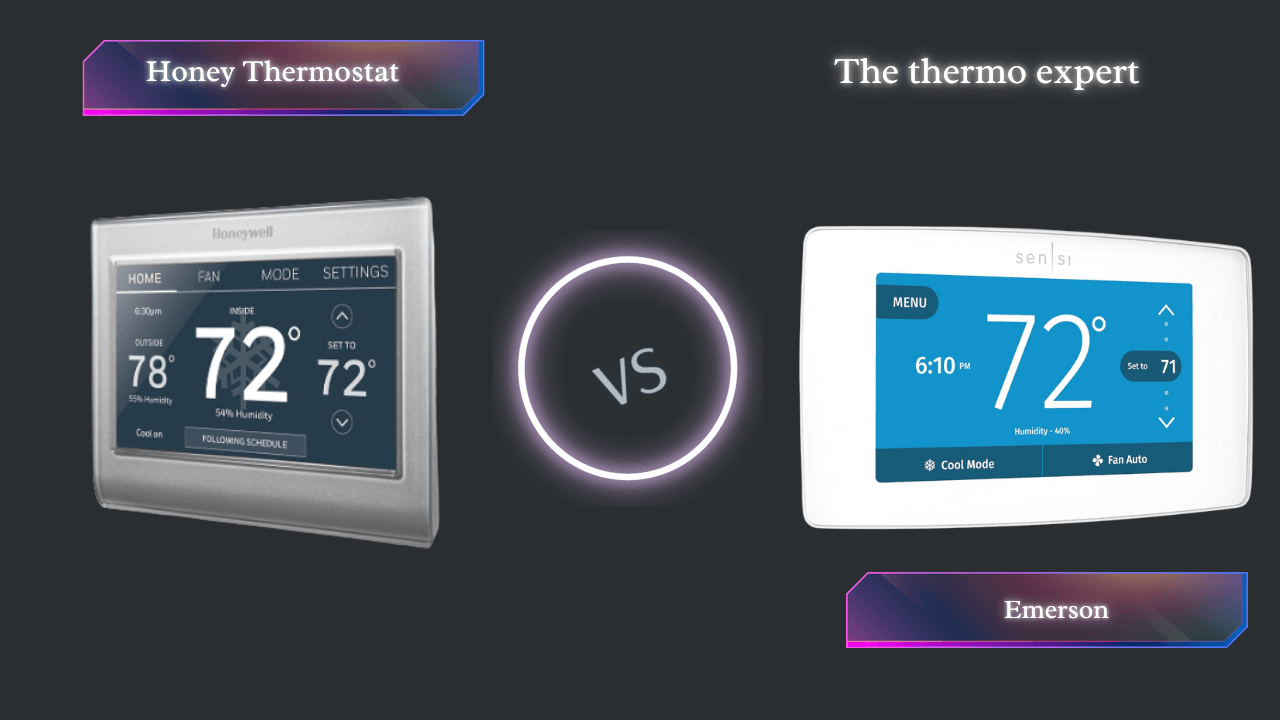
Honeywell vs. Emerson: The 2026 Smart Thermostat Showdown
The definitive guide to choosing the right Wi-Fi thermostat for your smart home ecosystem.
Choosing a smart thermostat is one of the highest-impact upgrades you can make to your home. It’s not just about convenience; it’s about significant energy savings, customized comfort, and seamless integration with your digital life.
In this comprehensive 2026 analysis, we compare the feature-rich Honeywell Wi-Fi Smart Color Thermostat (RTH9585WF) against the user-friendly Emerson Sensi Touch Wi-Fi Smart Thermostat (ST75W).
At a Glance: Feature Face-Off
While both excel at core functions, their differences are stark when you look at the ecosystem details.
| Feature | Honeywell Smart Color | Emerson Sensi Touch |
|---|---|---|
| Display | Customizable Color | Modern Touchscreen |
| Apple HomeKit | ✕ No | ✓ Yes |
| Google/Alexa | ✓ Yes | ✓ Yes |
| C-Wire Required | Required | Required |
| Learning | ✓ Smart Response | ✕ Manual Schedule |
Deep Dive: Honeywell Wi-Fi Smart Color
Honeywell represents the “Information Center” philosophy. The RTH9585WF is built for those who love data and customization.

Honeywell Home RTH9585WF
A data-rich command center that learns your home’s heating cycles. Best for non-Apple users who want detailed info at a glance.
Check Price on AmazonIntelligent Comfort
Honeywell uses “Smart Response Technology.” It learns your home’s thermal properties. If you want it to be 70°F at 7 AM, it calculates exactly when to turn on to hit that target precisely on time.
Pros
- Shows indoor/outdoor temp & humidity on screen.
- Background color matches your wall paint.
- Smart Response pre-heating/cooling.
Cons
- No Apple HomeKit Support.
- Requires C-Wire (no battery backup).
- App interface is slightly dated.
Deep Dive: Emerson Sensi Touch
Emerson focuses on “Simplicity and Connectivity.” The Sensi Touch is widely regarded as the easiest smart thermostat to install.

Emerson Sensi Touch (ST75W)
The champion of DIY installation and Apple HomeKit compatibility. Sleek, reliable, and user-friendly.
Check Price on AmazonUniversal Support
The Sensi Touch works with everyone: Alexa, Google, SmartThings, and Apple HomeKit. This makes it the safer bet for mixed-technology households.
Pros
- Apple HomeKit Certified.
- Best-in-class installation guide app.
- Sleek, modern physical design.
Cons
- No “Learning” mode (Manual scheduling only).
- Display shows less data than Honeywell.
- Requires C-Wire.
Installation & The “C-Wire Conundrum”
Both devices require a C-wire (Common wire) for continuous power. If you pop off your current faceplate and don’t see a wire labeled “C”, you have two options:
- Use an Adapter Kit: Sensi often includes one, or you can buy a “Add-a-Wire” kit.
- Run New Wire: This usually requires an HVAC professional.
The Verdict: Which is Best for 2026?
🏆 Choose Honeywell Smart Color If…
You want a detailed weather station on your wall, you use Alexa/Google, and you want the system to intelligently “learn” how long it takes to heat your home.
🏆 Choose Emerson Sensi Touch If…
You use Apple HomeKit, you are nervous about DIY installation (Sensi’s guide is superior), or you prefer a minimalist design.
Frequently Asked Questions
Do these work if Wi-Fi goes down?
Yes. Both function as standard manual thermostats without Wi-Fi. You just lose app control.
Can I control multiple zones?
Yes, both apps support multi-zone control, allowing you to name them (e.g., “Upstairs”, “Downstairs”).






 Home
Home
 Info
Info
 Compare
 Reviews
 Shop
Shop